Flight price alerts are automated notification systems that track airfare changes on specific routes and send emails or push notifications when prices drop, rise, or reach a target fare level. Google Flights, Skyscanner, and Hopper provide free flight price tracking for all airlines.
Setting up price alerts across multiple tracking tools is the most effective strategy for catching fare drops on Indian domestic and international routes. This guide covers step-by-step setup instructions, tool comparisons, India-specific tracking strategies, and common mistakes to avoid.
What are flight price alerts and how do they work?
Flight price alerts are automated notifications that track airfare changes on a specific route and send emails or push notifications when prices drop, rise, or reach a target level. Google Flights, Skyscanner, and Hopper provide free flight price tracking for all airlines.
A flight price alert monitors the fare on a route you select (for example, Delhi to Goa on December 15) and sends you a notification when the price changes. The alert system checks airline inventory and OTA (Online Travel Agency) pricing databases multiple times per day. When the fare drops below your tracked price or crosses a significant threshold, the system triggers a notification.
Price alerts eliminate the need for manual daily fare checking. Instead of visiting booking websites repeatedly, travelers receive automatic updates when fares move in their favour.

How airline pricing algorithms create fare fluctuations
Airlines use revenue management systems (RMS) to adjust ticket prices in real time. These systems analyze 4 primary inputs: remaining seat inventory on each flight, current booking pace (how fast seats are selling), competitor pricing on the same route, and historical demand data for that date and route.
A Delhi-Mumbai flight departing during Diwali week experiences different pricing behaviour than the same flight on a regular Tuesday in February. The RMS increases fares when demand rises and reduces fares when booking pace slows.
Understanding these fluctuations is essential for effective price tracking. Fares on Indian domestic routes change 3 to 5 times per week on average. To understand the full mechanics behind ticket pricing, read our detailed guide on how airline pricing algorithms determine ticket costs.
Types of price alert notifications: email, push, and SMS
Price alert tools deliver notifications through 3 channels:
- Email alerts: Google Flights and Skyscanner send fare change updates to your registered email address. Email alerts provide detailed price history and comparison data.
- Push notifications: Hopper and airline apps (IndiGo, Air India, Akasa Air) send real-time alerts directly to your phone screen. Push notifications deliver faster response times than email alerts.
- SMS alerts: Select airlines send promotional fare alerts via SMS during flash sales. These are less common for route-specific tracking.
Push notifications offer the fastest alert delivery. Travelers who enable push notifications book fare drops 2 to 4 hours faster than email-only trackers.
How do you set up flight price alerts on Google Flights?
Set up Google Flights price alerts by searching your route and dates, then enabling the “Track prices” toggle on the results page. Google sends email notifications when fares change. The date grid and Explore map help identify cheapest travel dates.
Google Flights is a free fare comparison tool operated by Google. It aggregates pricing data from airlines and OTAs but does not sell tickets directly. Google Flights redirects you to the airline or OTA website to complete your booking.
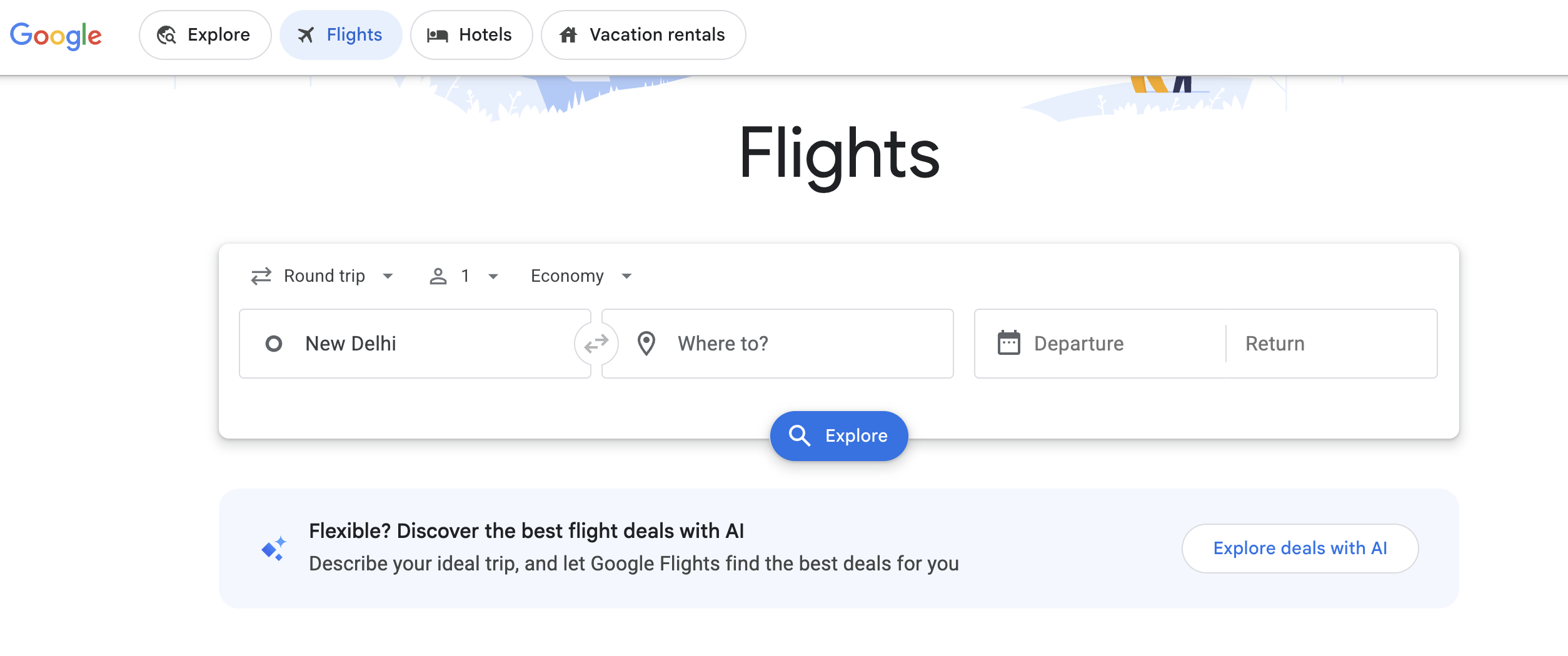
Step-by-step: enabling the “Track prices” toggle
Follow these 5 steps to activate price tracking on Google Flights:
- Open Google Flights at google.com/travel/flights.
- Enter your departure city, destination city, and travel dates. Select one-way or round-trip.
- View the search results page showing available flights and fares.
- Locate the “Track prices” toggle near the top of the results page.
- Enable the toggle. Google will send email notifications to your Gmail account when fares on this route change.
Google tracks prices for your specific selected dates. You can also select “Any dates” if your travel schedule is flexible. Google sends alerts when fares drop by a meaningful amount (typically ₹500 or more on domestic routes).
Using the date grid and Explore map to find cheapest dates
Google Flights provides 2 visual tools that help identify the cheapest travel dates before setting alerts:
- Date grid: Displays a calendar matrix showing the lowest fare for each departure and return date combination. The date grid reveals that shifting travel by 1 to 2 days reduces fares by ₹1,000 to ₹5,000 on most domestic routes.
- Explore map: Displays a world map (or India map) with destination pins showing the lowest available fare from your departure city. The Explore map is ideal for flexible travelers who want to find the cheapest destination rather than tracking a fixed route.
Set your price alert after identifying the cheapest date range through the date grid. This ensures you track the most competitively priced date window.
Understanding “low”, “typical”, and “high” price labels
Google Flights assigns a price insight label to search results based on historical fare data for that route:
- Low: The current fare is below the historical average for this route and travel period. This label signals a good time to book.
- Typical: The current fare falls within the normal range for this route. Prices are neither discounted nor inflated.
- High: The current fare is above the historical average. This label signals that waiting for a fare drop (if your travel dates are flexible) is advisable.
Price insight labels use data from the previous 12 months of fare history on the same route. These labels are reliable indicators of relative fare positioning but do not guarantee future price movements.
How do you set up flight price alerts on Skyscanner?
Set up Skyscanner price alerts by searching your route, then tapping the bell icon (app) or clicking “Get Price Alerts” (website) on the results page. Enter your email to receive fare change notifications. Saving a flight auto-activates tracking.
Skyscanner is a global fare comparison platform that searches across hundreds of airlines and OTAs. Skyscanner covers a wider range of booking sources than Google Flights, including smaller regional OTAs and budget carrier direct sites.
Step-by-step: activating alerts on app and website
On the Skyscanner mobile app:
- Search for your route and travel dates.
- Tap the bell icon or “Get Price Alerts” button on the search results page.
- Confirm your email address. Skyscanner sends fare change updates to this email.
- Save the flight by tapping the heart icon. Saving a flight auto-activates fare tracking for that route.
On the Skyscanner website:
- Search for your route and dates on skyscanner.co.in.
- Click the “Get Price Alerts” button on the results page.
- Enter your email address in the alert signup form.
- Manage all active alerts through your Skyscanner account dashboard.
Skyscanner sends email alerts when fares change by more than 5% on your tracked route. You can manage, pause, or delete alerts from the “Saved” section in your account.
Using the “Whole Month” view for flexible date tracking
Skyscanner offers a “Whole Month” search option that displays the cheapest fare for every day in a selected month. This feature helps travelers with flexible dates identify the lowest fare day before setting a targeted alert.
Select “Whole Month” in the departure date field instead of choosing a specific date. Skyscanner displays a calendar view with daily fare prices colour-coded from green (cheapest) to red (most expensive). Set your price alert on the 3 to 5 cheapest days within your travel window for maximum fare drop coverage.
Which other tools track flight prices for Indian travelers?
Indian travelers track flight prices through Hopper (AI-powered “buy or wait” predictions), airline-direct alerts (IndiGo, Air India app notifications and Telegram channels), and Plane Pockets fare comparison engine. Each tool serves a different tracking need across domestic and international routes.
Hopper: AI prediction with “buy or wait” recommendations
Hopper is a mobile-first travel app that uses machine learning to predict whether flight prices on a specific route will rise or drop in the coming days. Hopper displays a colour-coded calendar where green dates indicate the lowest predicted fares and red dates indicate the highest predicted fares.
Hopper’s core feature is its buy or wait recommendation. The app analyzes historical fare patterns and real-time market data to advise travelers whether to book immediately or wait for a potential fare drop. Hopper claims 95% prediction accuracy on its blog (source: hopper.com).
Hopper’s limitation for Indian travelers is its primary optimization for North American and European routes. Domestic Indian route predictions (IndiGo, Air India, Akasa Air) carry lower data depth compared to US routes. Indian travelers benefit from using Hopper as a secondary prediction tool alongside Google Flights.
Airline-direct alerts: IndiGo, Air India, and Akasa Air notifications
Indian airlines operate their own fare alert channels that announce flash sales and promotional fares 12 to 24 hours before third-party aggregators display them:
- IndiGo: Subscribe to the IndiGo email newsletter and follow IndiGo’s official Telegram channel. IndiGo announces “6E Sale” events with fares starting at ₹999 through these channels first.
- Air India: Enable push notifications on the Air India app. Air India releases “AI Flash Sale” fares through the app before listing them on OTA platforms.
- Akasa Air: Follow Akasa Air on social media and subscribe to their email list. Akasa announces introductory route pricing through direct channels.
Airline-direct alerts provide the earliest access to promotional fares. Combining airline-direct alerts with Google Flights and Skyscanner tracking creates the widest fare monitoring coverage.
Plane Pockets: integrated fare comparison and price tracking
Plane Pockets compares fares across all Indian domestic and international airlines in a single search interface. The fare comparison engine displays the total cost (including convenience fees and taxes) rather than base fare alone. For AI-powered personalized fare recommendations, explore our PuNIMA AI travel assistant for personalized trip planning.
Google Flights vs Skyscanner vs Hopper: which flight price tracker is best?
Google Flights is best for visual price trends and date flexibility. Skyscanner is best for broad OTA coverage and route-specific alerts. Hopper is best for AI-powered booking timing predictions. Using all three tools together provides the most complete fare tracking coverage.
No single tool covers all fare sources. Each platform accesses different airline and OTA pricing databases. Using multiple tools ensures you catch fare drops that a single platform misses.
| Feature | Google Flights | Skyscanner | Hopper | Airline-Direct | Plane Pockets |
|---|---|---|---|---|---|
| Cost | Free | Free | Free (paid add-ons available) | Free | Free |
| Alert Type | Email only | Email only | Push notification + email | Push, email, Telegram, SMS | In-app notification |
| Date Flexibility Tools | Date grid + Explore map | Whole Month view | Colour-coded calendar | None (fixed sale dates) | Flexible search |
| OTA Coverage | Medium (major OTAs) | High (300+ sources) | Medium | Airline-only | All major Indian OTAs |
| Price Prediction | Low/Typical/High labels | None | AI buy or wait (95% claimed) | None | Fare comparison |
| India Domestic Accuracy | High | High | Medium | Highest (source data) | High |
| Best Use Case | Visual trends and cheapest dates | Broadest fare comparison | Booking timing advice | Flash sale early access | Total cost comparison |
Recommended strategy: Set alerts on Google Flights for visual trend monitoring. Set alerts on Skyscanner for broad OTA coverage. Use Hopper for buy or wait timing on international routes. Subscribe to airline-direct channels for flash sale access. Use Plane Pockets for total cost verification before booking.
For a complete comparison of booking platforms, read our guide on best flight booking apps for fare comparison.
When should you start tracking flight prices and what mistakes should you avoid?
Start tracking domestic Indian flights 3 to 6 weeks before departure and international flights 2 to 4 months ahead. Common mistakes include setting alerts too late, tracking only one platform, ignoring total cost (baggage and fees), and waiting too long after a fare drop notification.
Optimal tracking windows for domestic and international flights
The optimal booking window determines when price tracking delivers maximum value:
- Indian domestic flights (IndiGo, Air India, Akasa Air, SpiceJet): Start tracking 6 weeks before departure. The lowest fares on domestic routes appear 3 to 6 weeks before the travel date. Fares rise sharply within 2 weeks of departure as airline inventory tightens.
- International flights from India (Emirates, Singapore Airlines, Thai Airways): Start tracking 4 months before departure. International fare drops occur 2 to 4 months before the travel date. Early tracking captures seasonal fare adjustments and promotional pricing.
- Festival and long weekend travel (Diwali, Holi, Republic Day): Start tracking 8 to 10 weeks before the holiday date. Fares on high-demand routes (Delhi-Goa, Mumbai-Jaipur) increase 40% to 80% during long weekends.
For detailed fare prediction patterns across routes and seasons, read our analysis on flight fare prediction patterns and booking windows.
5 common price alert mistakes Indian travelers make
- Setting alerts too late: Starting price tracking 1 to 2 weeks before departure misses the optimal fare drop window. Most domestic fare drops occur 3 to 6 weeks before departure, not in the final week.
- Tracking only one platform: Google Flights and Skyscanner access different OTA databases. A fare visible on Skyscanner may not appear on Google Flights. Track the same route on at least 2 platforms simultaneously.
- Ignoring total cost vs base fare: OTAs display base fares that exclude convenience fees (₹200 to ₹500 per booking), payment gateway charges, and baggage costs. Always calculate the total cost before deciding if a fare drop represents genuine savings.
- Waiting too long after a fare drop notification: Fare drops on popular Indian routes last 4 to 24 hours before inventory at the discounted price level sells out. Delaying a booking decision by 2 to 3 days after receiving a drop alert results in missing the discounted fare.
- Not comparing across booking channels: The fare shown on an OTA may differ from the fare on the airline’s own website. After receiving a fare drop alert, verify the price directly on the airline website and on Plane Pockets to confirm the lowest total cost.
To understand how price drops connect to broader savings strategies, read our guide on off-season travel pricing across Indian destinations.
What to do within 4 to 24 hours of receiving a fare drop alert
Receiving a fare drop alert requires immediate action. Follow this 4-step framework:
- Verify the fare: Open the tracking platform (Google Flights or Skyscanner) and confirm the fare is still available at the alerted price. Prices change rapidly; verification prevents booking at a different rate.
- Check total cost: Add baggage fees, seat selection charges, convenience fees, and payment gateway charges to the base fare. A ₹4,500 base fare with ₹800 in add-on fees costs ₹5,300 total.
- Compare across platforms: Check the same flight on the airline’s own website, on Plane Pockets, and on 1 to 2 OTAs. The same flight sometimes costs ₹500 to ₹2,000 less on one platform compared to another.
- Book within the window: Complete your booking within 4 to 24 hours of receiving the alert. Fare drops on high-demand routes (Delhi-Goa, Mumbai-Bangalore, Bangalore-Hyderabad) sell out within hours.
Travelers who miss a fare drop alert benefit from setting up alerts for nearby dates. A fare drop on December 15 often indicates similar pricing on December 14 or December 16 for the same route.
For strategies on booking discounted fares at the last minute, read our guide on last-minute travel deals on flights and hotels.
Frequently asked questions about flight price alerts
Are flight price alerts free on Google Flights and Skyscanner?
Yes. Google Flights and Skyscanner provide flight price alerts completely free. No subscription, payment, or premium account is required. Google sends alerts to your Gmail account. Skyscanner sends alerts to any email address you register. Hopper provides free alerts with optional paid add-ons (Price Freeze, flexible cancellation) that are not required for basic tracking.
Do flight prices drop on Tuesday in India?
No, this is a common myth. Historical fare data across Indian domestic routes shows no consistent pattern of fares dropping on Tuesdays. Airlines adjust prices based on demand, inventory, and booking pace, not based on the day of the week. Fare drops occur on any day when booking pace slows on a specific route. Setting up daily price alerts is more effective than checking fares only on Tuesdays.
Can price alerts guarantee the lowest fare?
No. Price alerts track fare changes and notify you when prices drop, but they do not guarantee you will receive the absolute lowest fare. Airline pricing changes multiple times daily. A fare may drop further after you book, or it may rise before you act on an alert. Price alerts increase the probability of catching fare drops but do not eliminate pricing uncertainty.
How many routes can you track simultaneously?
Google Flights allows tracking unlimited routes simultaneously. Skyscanner allows unlimited active alerts per account. Hopper supports tracking multiple routes within the app. The recommended strategy is to track 3 to 5 priority routes across all three platforms. Tracking too many routes (20+) creates alert fatigue, making it harder to act quickly on genuine fare drops.
Does incognito browsing affect flight prices shown to you?
No. Airlines and OTAs do not increase prices based on your browsing history or cookie data. This is a widely circulated myth. Fare changes between searches result from real-time inventory adjustments by airline revenue management systems, not from tracking individual users. Searching in incognito mode and regular mode produces identical fares when searched at the exact same moment.
Key Takeaways for Flight Price Tracking
- Set up alerts on multiple platforms: Use Google Flights for visual trends, Skyscanner for broad OTA coverage, and airline-direct channels for flash sale access.
- Start early: Track domestic flights 3 to 6 weeks before departure. Track international flights 2 to 4 months ahead.
- Enable push notifications: Push notifications deliver faster alert response than email-only tracking.
- Act within 4 to 24 hours: Fare drops on popular Indian routes sell out within hours. Verify, compare, and book quickly.
- Check total cost: Add convenience fees, baggage charges, and payment gateway costs before confirming a fare drop represents genuine savings.